
//The following line is critical for menu operation, and MUST APPEAR ONLY ONCE. If you have more than one menu_array.js file rem out this line in subsequent files
menunum=0;menus=new Array();
_d=document;
function addmenu()
   {menunum++;menus[menunum]=menu;}
function dumpmenus()
   {mt="<script language=javascript>";
   for(a=1;a<menus.length;a++){mt+=" menu"+a+"=menus["+a+"];"}mt+="<\/script>";_d.write(mt)}
//Please leave the above line intact. The above also needs to be enabled if it not already enabled unless this file is part of a multi pack.


////////////////////////////////////
// Editable properties START here //
////////////////////////////////////

// Special effect string for IE5.5 or above please visit http://www.milonic.co.uk/menu/filters_sample.php for more filters
if(navigator.appVersion.indexOf("MSIE 6.0")>0)
{
	effect = "Fade(duration=0.3);Alpha(style=0,opacity=100);Shadow(color='#404040', Direction=135, Strength=3)"
}
else
{
	effect = "Shadow(color='#BBBBBB', Direction=135, Strength=2)" // Stop IE5.5 bug when using more than one filter
}


timegap=500					// The time delay for menus to remain visible
followspeed=5				// Follow Scrolling speed
followrate=40				// Follow Scrolling Rate
suboffset_top=1;			// Sub menu offset Top position 
suboffset_left=-1;			// Sub menu offset Left position

style1=[				// style1 is an array of properties. You can have as many property arrays as you need. This means that menus can have their own style.
"ffffff",				// Mouse Off Font Color
"#6699CC",				// Mouse Off Background Color
"E0F6FF",				// Mouse On Font Color
"#6699CC",				// Mouse On Background Color
"white",				// Menu Border Color 
10,						// Font Size in pixels
"normal",				// Font Style (italic or normal)
"bold",					// Font Weight (bold or normal)
"Verdana, Arial",		// Font Name
7.5,						// Menu Item Padding
,						// Sub Menu Image (Leave this blank if not needed)
,						// 3D Border & Separator ba

"66ffff",				// 3D High Color
"000099",				// 3D Low Colorr

"white",				// Current Page Item Font Color (leave this blank to disable)
"#6699CC",					// Current Page Item Background Color (leave this blank to disable)
,						// Top Bar image (Leave this blank to disable)
"ffffff",				// Menu Header Font Color (Leave blank if headers are not needed)
"#6699CC",				// Menu Header Background Color (Leave blank if headers are not needed)
]

style2=[				// style1 is an array of properties. You can have as many property arrays as you need. This means that menus can have their own style.
"4F617B",				// Mouse Off Font Color
"white",				// Mouse Off Background Color
"white",				// Mouse On Font Color
"#6699CC",				// Mouse On Background Color
"#6699CC",				// Menu Border Color 
9,					// Font Size in pixels
"normal",				// Font Style (italic or normal)
"bold",					// Font Weight (bold or normal)
"Verdana, Arial",			// Font Name
3,					// Menu Item Padding
,					// Sub Menu Image (Leave this blank if not needed)
,					// 3D Border & Separator bar
"66ffff",				// 3D High Color
"000099",				// 3D Low Color
"E0F6FF",				// Current Page Item Font Color (leave this blank to disable)
"#6699CC",					// Current Page Item Background Color (leave this blank to disable)
,					// Top Bar image (Leave this blank to disable)
"ffffff",				// Menu Header Font Color (Leave blank if headers are not needed)
"grey",				// Menu Header Background Color (Leave blank if headers are not needed)
]

addmenu(menu=[				// This is the array that contains your menu properties and details
"mainmenu",				// Menu Name - This is needed in order for the menu to be called
400,					// Menu Top - The Top position of the menu in pixels
15,					// Menu Left - The Left position of the menu in pixels
280,					// Menu Width - Menus width in pixels
0,					// Menu Border Width 
,					// Screen Position - here you can use "center;left;right;middle;top;bottom" or a combination of "center:middle"
style1,					// Properties Array - this is set higher up, as above
1,					// Always Visible - allows the menu item to be visible at all time (1=on/0=off)
"left",				// Alignment - sets the menu elements text alignment, values valid here are: left, right or center
,					// Filter - Text variable for setting transitional effects on menu activation - see above for more info
,					// Follow Scrolling - Tells the menu item to follow the user down the screen (visible at all times) (1=on/0=off)
0, 					// Horizontal Menu - Tells the menu to become horizontal instead of top to bottom style (1=on/0=off)
,					// Keep Alive - Keeps the menu visible until the user moves over another menu or clicks elsewhere on the page (1=on/0=off)
,					// Position of TOP sub image left:center:right
,					// Set the Overall Width of Horizontal Menu to 100% and height to the specified amount (Leave blank to disable)
,					// Right To Left - Used in Hebrew for example. (1=on/0=off)
,					// Open the Menus OnClick - leave blank for OnMouseover (1=on/0=off)
,					// ID of the div you want to hide on MouseOver (useful for hiding form elements)
,					// Reserved for future use

,"&nbsp;&nbsp;&nbsp;&nbsp;-&nbsp;Corrugated Board & Box making Machines","show-menu=Corrugated Board & Box making Machines",,,1
,"&nbsp;&nbsp;&nbsp;&nbsp;-&nbsp;Binding Machines","show-menu=Binding Machines",,,1
,"&nbsp;&nbsp;&nbsp;&nbsp;-&nbsp;Die Cutting","show-menu=Die Cutting",,,1
,"&nbsp;&nbsp;&nbsp;&nbsp;-&nbsp;Lamination Machines","show-menu=Lamination Machines",,,1
,"&nbsp;&nbsp;&nbsp;&nbsp;-&nbsp;Stitching Machines","show-menu=Stitching Machines",,,1
,"&nbsp;&nbsp;&nbsp;&nbsp;-&nbsp;Pulp & paper Making Plants","show-menu=Pulp & Paper Making Plants","pulp.htm",,1
,"&nbsp;&nbsp;&nbsp;&nbsp;-&nbsp;Drum & Barrel Making Machines","show-menu=Drum & Barrel Making Machines",,,1


])


	addmenu(menu=["Corrugated Board & Box making Machines",
	,,320,1,"",style2,,"left",effect,,,,,,,,,,,,
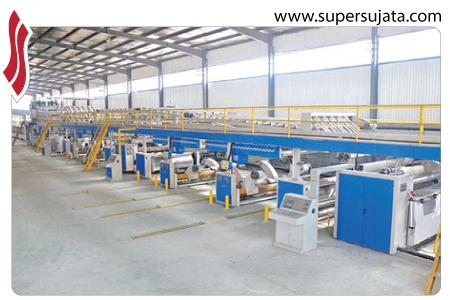
	,"&nbsp;&nbsp;3/5 Ply Automatic Online Corrugated Board Making Plant","corrugated16.htm",,,1
	,"&nbsp;&nbsp;High Speed Oblique Type Corrugating Machine","corrugated1.htm",,,1
	,"&nbsp;&nbsp;Oblique Type Paper Corrugating Machine (Bearing  Mounted)","corrugated2.htm",,,1
	,"&nbsp;&nbsp;Oblique Type Single Face Paper Corrugating Machine","corrugated3.htm",,,1
	,"&nbsp;&nbsp;Vertical Type Single Face Paper Corrugating Machine","corrugated4.htm",,,1
	,"&nbsp;&nbsp;Double Profile Single Face Corrugation Machine","corrugated15.htm",,,1
	,"&nbsp;&nbsp;Reel To Sheet Cutting Machine","corrugated5.htm",,,1
	,"&nbsp;&nbsp;Board Cutter","corrugated6.htm",,,1
	,"&nbsp;&nbsp;Sheet Pasting Machine","corrugated7.htm",,,1
	,"&nbsp;&nbsp;Sheet Pressing Machine","corrugated8.htm",,,1
	,"&nbsp;&nbsp;Four Bar Rotary Cutting & Creasing Machine","corrugated9.htm",,,1
	,"&nbsp;&nbsp;Eccentric Slotter","corrugated10.htm",,,1
	,"&nbsp;&nbsp;Platen Punching Machine","corrugated11.htm",,,1
	,"&nbsp;&nbsp;Single/Two/Three Color Flexo Printing Machine","corrugated12.htm",,,1
	,"&nbsp;&nbsp;Combined Rotary Creasing, Slotting & Slitting Machine","corrugated13.htm",,,1
	,"&nbsp;&nbsp;Box Stitching Machine","corrugated14.htm",,,1
	,"&nbsp;&nbsp;Semi-Automatic Gluing Machine","corrugated17.htm",,,1
		
		])


	addmenu(menu=["Binding Machines",
	,,280,1,"",style2,,"left",effect,,,,,,,,,,,,
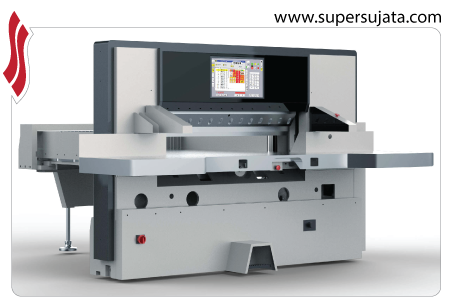
	,"&nbsp;&nbsp;Hydraulic Fully Automatic paper cutting","binding1.htm",,,1
	,"&nbsp;&nbsp;Fully Automatic paper cutting (Self Clamp)","binding2.htm",,,1
	,"&nbsp;&nbsp;High Speed Semi Aoutomatic paper Cutting","binding3.htm",,,1
	,"&nbsp;&nbsp;Paper Cutting Machine","binding4.htm",,,1
	,"&nbsp;&nbsp;Fully Automatic paper Cutting (Motorized Clamping)","binding5.htm",,,1
	,"&nbsp;&nbsp;Thread Book Sewing Machine","binding6.htm",,,1

		
		])	

	addmenu(menu=["Die Cutting",
	,,300,1,"",style2,,"left",effect,,,,,,,,,,,,
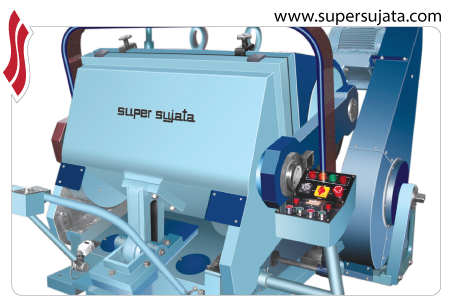
	,"&nbsp;&nbsp;Heavy Duty Die Cutting, Creasing and Embossing Platen","die1.htm",,,1
	,"&nbsp;&nbsp;Platen Die Cutting Machine with Hot Foil Attachment","die2.htm",,,1

		
		])	

	addmenu(menu=["Lamination Machines",
	,,220,1,"",style2,,"left",effect,,,,,,,,,,,,
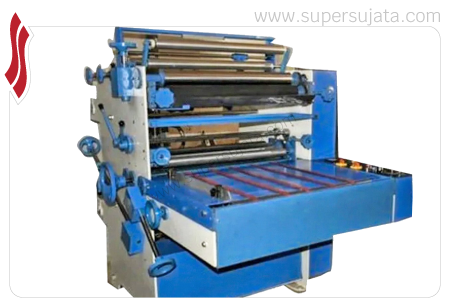
	,"&nbsp;&nbsp;Window Cum Plain Lamination Machine","lamination1.htm",,,1
	,"&nbsp;&nbsp;Plain Lamination Machine","lamination2.htm",,,1

		
		])

	addmenu(menu=["Stitching Machines",
	,,220,1,"",style2,,"left",effect,,,,,,,,,,,,
	,"&nbsp;&nbsp;Box Stitching Machines","",,,1
	,"&nbsp;&nbsp;&nbsp;&nbsp;&nbsp;&nbsp;&nbsp;-&nbsp;Straight Box Stitcher","stitching2.htm",,,1
	,"&nbsp;&nbsp;&nbsp;&nbsp;&nbsp;&nbsp;&nbsp;-&nbsp;Angular Box Stitcher","stitching1.htm",,,1
	,"&nbsp;&nbsp;&nbsp;&nbsp;&nbsp;&nbsp;&nbsp;-&nbsp;Parts of Box Stitching Machine","stitching3.htm",,,1
	,"&nbsp;&nbsp;Book Stitching Machines","",,,1
	,"&nbsp;&nbsp;&nbsp;&nbsp;&nbsp;&nbsp;&nbsp;-&nbsp;Double Head Book Stitching Machine","stitching5.htm",,,1
	,"&nbsp;&nbsp;&nbsp;&nbsp;&nbsp;&nbsp;&nbsp;-&nbsp;Book Stitching Machine","stitching4.htm",,,1

		
		])

	addmenu(menu=["Drum & Barrel Making Machines",
	,,230,1,"",style2,,"left",effect,,,,,,,,,,,,
	,"&nbsp;&nbsp;Shearing Machine","drumc1.htm#sm",,,1
	,"&nbsp;&nbsp;Double Edge Grinding Machine","drumc1.htm#de",,,1
	,"&nbsp;&nbsp;Round Rolling Machine","drumc1.htm#rrm",,,1
	,"&nbsp;&nbsp;Spot Welding","drumc1.htm#sw",,,1
	,"&nbsp;&nbsp;Side Seam Welding Machine","drumc1.htm#ssw",,,1
	,"&nbsp;&nbsp;Bead Expander (Hydraulic Type)","drumc1.htm#be",,,1
	,"&nbsp;&nbsp;Corrugation Machine (Rotary Type)","drumc1.htm#cm",,,1
	,"&nbsp;&nbsp;Flanging Machine (Rotary Type)","drumc1.htm#fm",,,1
	,"&nbsp;&nbsp;Double Ended Flanging Machine (Hydraulic)","drumc1.htm#def",,,1
	,"&nbsp;&nbsp;Semi Automatic End Seaming Machine","drumc1.htm#sae",,,1
	,"&nbsp;&nbsp;Circle Cutting Machine","drumc1.htm#cc",,,1
	,"&nbsp;&nbsp;Power Press and Dies","drumc1.htm#ppd",,,1

		
		])


dumpmenus()